GoPro MAX2 for Real Estate: Photo Formats & HDRI Workflow

Still-photo workflow guide · Property and business tours
MAX2 offers more than action video, but the important question for a virtual-tour business is how efficiently it produces a finished spherical still. Ordinary photo capture and the optional GoPro Labs HDRI process are different workflows—and should be evaluated separately.
Our assessment
MAX2 deserves a trial if your business combines property photographs with outdoor video and you already use GoPro equipment. For an interior-only service, do not buy on the strength of an 8K video headline. Test window exposure, stitching and the final spherical export, including the time required to get there.
The central decision is whether you need quick, repeatable individual photos or are willing to manage a bracketed desktop workflow. Neither route is automatically superior for every room. The right choice is the one that consistently meets the client brief without turning ordinary delivery into an experiment.
MAX2 hardware at a glance
| Feature | Specification |
|---|---|
| Sensor / optics | 1/2.3-inch-type sensors; f/1.8 aperture. |
| Body | 195 g; 64.0 × 69.7 × 48.7 mm; 1.82-inch touch display. |
| 360 capture | 29 MP (7680 × 3840) still photos; 8K (7680 × 3840) video at up to 30 fps. |
| Single-lens capture | 12 MP (4000 × 3000) still photos; 4K video at up to 60 fps. |
| Photo exposure | Photo shutter: Auto or 1/125–1/2000 s; ISO 100–3200. Night Photo ISO: 100–800; shutter: Auto or 2, 5, 10, 15, 20 or 30 s. |
| Battery / storage | 1960 mAh Enduro battery; microSD, microSDHC or microSDXC, Class A2 and V30 or higher, up to 1 TB. |
| Water protection | Waterproof to 5 m (16 ft) with the door securely closed. GoPro cautions that image distortion makes MAX2 unsuitable for underwater photography. |
Sources: GoPro’s MAX2 technical specifications and MAX2 manual. Resolution figures describe camera outputs; they are not sensor-resolution or image-quality measurements. The manual’s Standard, HDR and RAW output selections apply to Single Lens Photo.
Photo modes and file-format choices
| Feature | What the documentation establishes |
|---|---|
| 360 and Single Lens modes | Spherical capture or conventional photographs |
| Advertised spherical photo resolution | 29 MP, according to the current MAX2 product page; not a measured detail score |
| Photo preset | SuperPhoto image processing |
| Burst | Up to 30 photos in 3 seconds in 360 mode |
| Night Photo | Automatic shutter adjustment for low-light 360 capture |
| 360 Photo Format | .36P by default, or .JPG; the manual distinguishes their GoPro-app compatibility |
| RAW output setting | Listed under Single Lens Photo, not spherical Photo, in the manual's photo-settings table. |
Source: GoPro MAX2 manual. It identifies .36P as the GoPro-app-compatible default and describes the alternative .JPG as incompatible with those apps. The “360 Photo Format” entry contains a wording inconsistency referring to videos, so test current behavior rather than treating that sentence as a universal software guarantee.
Our recommendation is to choose the format around the intended delivery route. Do not capture an entire assignment before proving that your chosen software can open, edit and export the result. A file that works in an app preview is not yet a verified virtual-tour scene.
The manual's printed page 25 assigns Standard, HDR and RAW output choices specifically to Single Lens Photo. Do not interpret MAX2 RAW support as a documented spherical RAW mode, or .36P as a RAW format.
GoPro's MAX2 product page confirms the 29 MP spherical-photo specification. Its cropping and reframing examples serve different deliverables from an interactive full-sphere property tour. Retain the spherical master even when creating conventional promotional images from it.
File recognition is not the same as a finished tour export
More specifically, Mapillary's MAX-series guide, updated 21 August 2026, describes 29 MP MAX2 time-lapse photos as JPG files and says its desktop uploader accepts the imagery without separate stitching in GoPro software. It requires GPS-bearing imagery. This is the platform developer's documented mapping workflow, not our test of individual indoor photographs, Quik exports or another hosting platform. Its route does not resolve every .36P processing question.
There is primary evidence of third-party .36P recognition: Mapillary Tools v0.14.5 release notes include support for that extension. The associated code change adds .36p to its image-file recognition list. This establishes a specific tool's file-handling support, not a test of GoThru, Quik export dimensions, HDR processing or indoor image quality. It also does not establish what every other application will accept.
Keep still and video documentation separate. GoPro's Media SDK documentation describes converting .360 spherical video into equirectangular output; it does not establish a .36P still-photo export procedure. For your actual tour software, test a copied original, verify the full sphere and compare the saved dimensions with the source before committing a whole job. Do not rename or overwrite the only original to work around an import problem.
Mapillary is mentioned here as software evidence, not as a recommended destination for private interiors. Do not upload client rooms, restricted construction areas or sensitive site details to a mapping service merely to test whether a file opens. Use a non-sensitive sample and a delivery environment approved for the assignment.
Optional Labs HDRI: a desktop process, not an instant tour mode
Keep a record of the installed Labs build as well as the macro. The official Labs release notes have a separate MAX2 section: its October 2025 entry documents gamma and exposure-query changes for HDRI work, and its March 2026 entry is numbered 1.30.70. Do not confuse that Labs build number with stock firmware 1.30 or apply another camera's entry from the same page. These notes document software changes, not measured improvements to a finished property panorama.
The official GoPro Labs HDRI guide provides a MAX2-oriented exposure macro with two-stop spacing and a desktop merge tool that outputs .HDR. It requires selecting JPG instead of .36P. The macro is triggered with the physical shutter or a compatible BLE remote, not Quik. Optional renamed files will not appear in camera playback or Quik.
The same page is inconsistent about sequence length: its introduction says up to eleven exposures, while its usage notes describe nine exposures taking about 33 seconds. Treat duration and count as configuration-dependent details to confirm on your setup. It also warns that auto shutdown is disabled while the HDRI preset is selected.
GoPro's 19 November 2025 update announcement describes Labs as a public beta and gives an HDRI range of eight to eleven exposures approximately two stops apart. Its stated applications are 3D, visual effects and virtual-production lighting. That supports treating this as an optional specialist process, not a fixed nine-shot standard photo mode or proof of a one-step property-tour export. Keep the exact firmware and macro settings with your test results.
Our interpretation: this is an advanced option worth evaluating in static spaces, not a basis for promising a fixed time per room. It does not establish a standard stitched RAW-photo mode. Nor is its .HDR output automatically a ready-to-upload tour image; verify a suitable tone-mapped spherical delivery format for the hosting system.
What two-stop bracket spacing means
GoPro also documents a separate Labs Photo Bracketing preset, BRKT. Its configuration lets you select exposures from −4 to +4 EV, up to nine positions, and set a start delay. This is not the same preset as the HDRI macro above: the two-stop spacing illustrated below belongs to HDRI, not a mandatory spacing for every BRKT selection.
For MAX2, BRKT's setup specifies JPG instead of .36P. Its RAW instruction explicitly applies to MAX2 Single Lens and HERO12/13, so it does not establish spherical RAW. Like HDRI, BRKT requires the physical shutter or a compatible BLE remote rather than Quik, keeps the camera on while selected and can optionally rename files in a way that hides them from camera/Quik playback. Treat these as workflow constraints to rehearse, not an automatic HDR-tour export. The BRKT page does not demonstrate a finished interior panorama or a hosting upload.
Relative exposure: illustrative three-position excerpt
−2 EV — 0.25× reference exposure
0 EV — 1× reference exposure
+2 EV — 4× reference exposure
For a room with bright windows, the reason to test brackets is to collect different exposures for later combination. The practical question is whether the finished result preserves useful information without distracting artifacts. A larger exposure span does not by itself prove a better photograph.
Keep the camera stationary and inspect anything that moved between frames: people, doors, curtains, foliage through windows and changing displays. Archive the source group together with the processed result. That lets you revise an edit without losing the connection to what was actually captured.
What reviewers add to the decision
In his March 2026 firsthand comparison for 360 Labs, Matt Rowell confirms that MAX2 GPR RAW is restricted to single-lens photography and describes JPEG-only interval photos. His main test was immersive video, where he observed some hard stitch lines and criticized the limited ability to revise baked-in stitching. Those video observations are reasons to examine seams in your own still workflow, not proof that every MAX2 property photograph has the same defect.
Sam Kieldsen's first-hand TechRadar review praised daylight footage but criticized low-light results and reported lens condensation during changing conditions. He tested a manufacturer-supplied unit around launch. Those observations identify things to check; they do not constitute a controlled real-estate still-photo comparison or a test of the later Labs HDRI workflow.
Firmware context matters when revisiting launch reviews. GoPro's 25 June 2026 announcement describes additional video controls, including up to 200 Mbps recording in selected modes. It does not establish an improvement in spherical still-photo detail or window exposure. The update page retrieved for this guide still lists v1.30 dated 17 March 2026, so these sources do not establish a consistent latest-version chronology. Record your actual firmware and whether it is standard or Labs before comparing results.
Further viewing: Hugh Hou's MAX2 comparison with DJI Osmo 360 and Insta360 X5. The video's title and creator have been verified, but we have not independently inspected its full findings, so no additional performance claims are attributed to it here.
A useful interior acceptance test
Choose a room with a bright exterior view, dark furniture and a nearby vertical edge. Capture your intended normal workflow first. If you plan to use Labs, repeat through that complete process and compare the finished images at the same field of view, not just as flat thumbnails.
Measure your own processing time and count how many scenes require correction. Check the seam separately from overall exposure. A bracket merge can change tonal balance without fixing a stitching problem, and attractive daylight footage does not answer either question.
Repeat in a second room before standardizing the procedure. Match brightness and color across the sequence, then confirm the hosted result on a phone and desktop. A business tour should feel coherent as the visitor moves between spaces.
Construction-site documentation and lens maintenance
Our construction-site virtual-tour workflow gives the wider viewpoint, archive and delivery plan. Keep a MAX2 bracket sequence together as one source group and record which processing route produced its final panorama.
GoPro's MAX2 product page documents hand-replaceable lenses without special calibration. Our business interpretation is that repairability can reduce the consequence of lens damage, but it is not a substitute for inspection: test a replacement and examine both hemispheres before accepting a new job.
For construction, build a repeatable viewpoint list with room or zone identifiers, dates and access notes. Use static scenes for any bracketed sequence. Capture separate detail photographs where the panorama cannot show enough, and record omitted areas rather than suggesting complete coverage.
Keep dust away from equipment maintenance and follow the manufacturer's lens-replacement procedure. This guide establishes no hazardous-location certification. A visual progress tour is not automatically a measured survey, BIM alignment or defect-detection system.
The manufacturer rates MAX2 waterproof to 5 m. That water-depth rating is not a dust classification, chemical-resistance claim or permission to operate in a hazardous area. It also does not guarantee clean underwater spherical stitching.
Compare photo workflows, not just video headlines
Existing GoPro users can compare the original MAX guide and Fusion guide to understand the different file-handling histories; do not transfer their capabilities automatically to MAX2. For an interior-oriented alternative, use the Theta Z1 RAW workflow guide. Compare finished window detail, seam cleanup and time per accepted scene. These are research paths, not a controlled camera ranking.
Delivery, travel and the buying decision
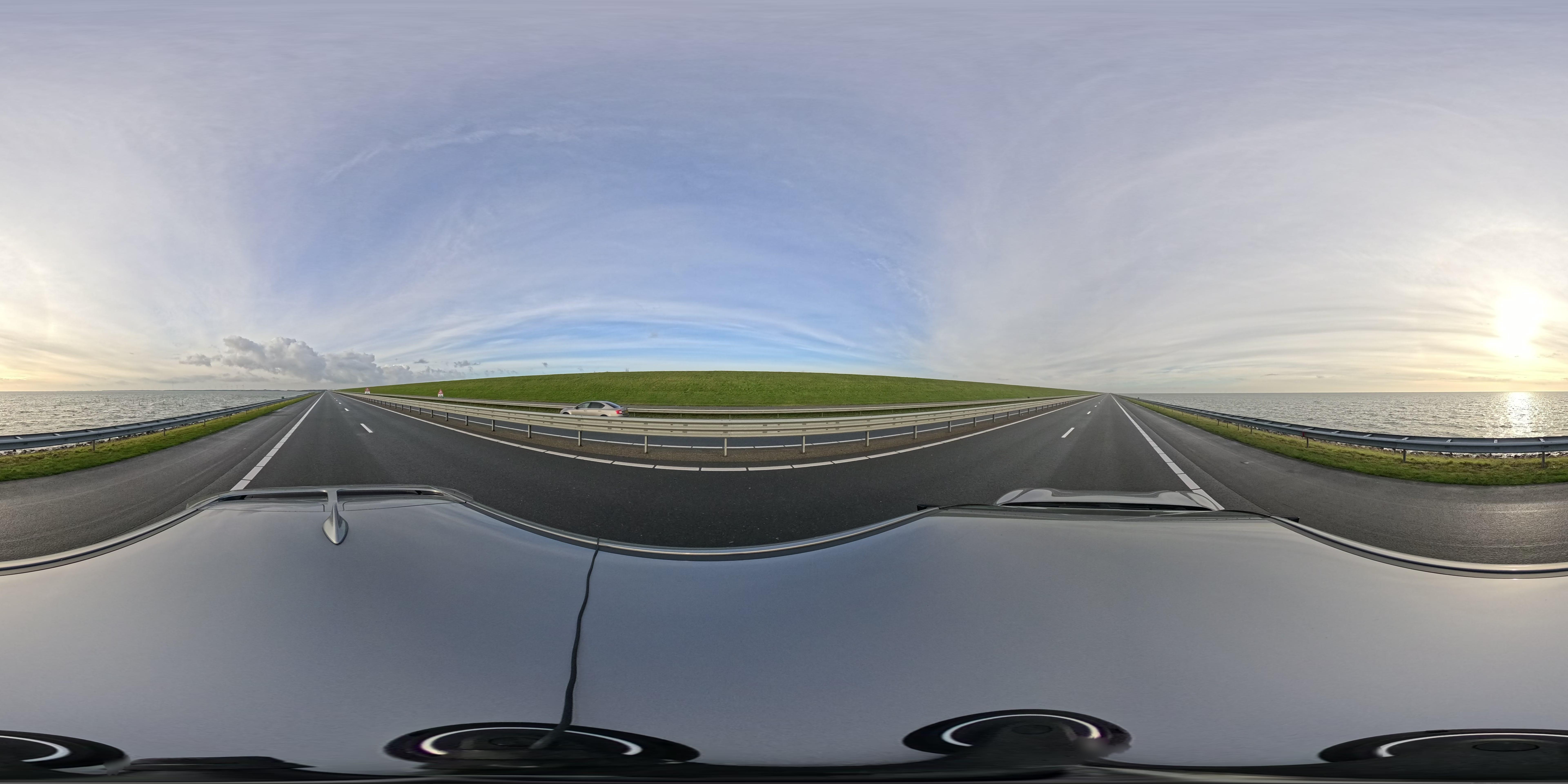
This example illustrates the full-sphere format and visible capture surroundings, including the vehicle roof below the camera. An outdoor street-level record answers a different brief from an interior property tour. Do not treat its displayed size, processing or capture setup as a controlled comparison with another camera.
Maintain separate archives for originals, processed masters and hosting copies. Confirm that the export remains spherical when that is the intended deliverable; a reframed conventional image has a different purpose. Review every direction for people, reflections, documents and neighboring property before publication.
GoThru operates this publication, but no MAX2-specific upload/export test is claimed. Owner-operated Panorra provides a related travel-storytelling context, not evidence of verified device integration.
Before buying, compare a normal photo session with your proposed bracketed process, including software time, power use, storage and any necessary accessories. For travel, test the whole route before departure. The strongest purchase case is a camera that meets both your outdoor creative needs and your actual property-delivery standard—not simply one with an impressive video specification.
Research checked 22 September 2026. This guide uses a credited third-party panorama rather than a product photograph. Current end-to-end spherical still export has not been tested by GoThru; firmware and source limitations are identified above. No hands-on rating is assigned.
Choosing between action cameras? Our GoPro MAX2 vs Insta360 X5 technical comparison compares photo formats, recording dimensions, firmware-dependent bitrate and virtual-tour workflows. Browse other published pairs in the comparison directory.
Considering DJI? Our DJI Osmo 360 vs GoPro MAX2 technical comparison explains panorama formats, firmware-dependent bitrate, internal storage and lens-replacement tradeoffs.
Prioritizing still tours? Our GoPro MAX2 vs Ricoh Theta Z1 technical comparison separates standard photo formats, Labs HDRI, RAW development and video capabilities.
Considering Insta360's newer model? Our GoPro MAX2 vs Insta360 X6 technical comparison examines photo formats, exact video modes, firmware changes and editing requirements.
For recurring ownership concerns, read GoPro MAX2 Problems, Complaints & Common Issues: What Owners Say, with corroborated Reddit reports, owner follow-ups and evidence limits.
Additional technical comparisons:



_2025-11-02_08H30M14S000_(1546019943479385_at_S5wp7d3cHai9lgKELnOqAW)_taken_with_GoPro_MAX2.jpg)
Comments ()