GoPro Fusion for Real Estate: RAW Photos & Virtual-Tour Workflow
Legacy camera analysis · Paired-file photo workflow
Fusion can be interesting for a photographer who already has a working capture-and-stitching setup. For a new virtual-tour business, the first question is whether you can reliably turn its paired camera files into finished spherical photographs on your own computer.
Our assessment
Do not buy a used Fusion solely because it offers RAW capture or an attractive video specification. Our suggested buying test is a complete indoor assignment: capture, copy both sides, process, stitch and deliver. Time that process and inspect the result before deciding whether the saving on hardware is worthwhile.
For an existing owner with a dependable workflow, retaining Fusion for suitable jobs may make sense. For a business starting from scratch, compare the total effort against a camera whose software and file delivery you can support comfortably. This is a workflow-led assessment rather than a current market ranking.
Photo features and their qualifications
| Feature | Documented behavior |
|---|---|
| Photo modes | Single, Night and Burst; marketed as 18 MP spherical capture |
| RAW format | GPR with accompanying JPEG; original manual limits RAW to Photo capture |
| Night shutter | Auto or 2, 5, 10, 20 and 30 seconds |
| Storage | Two microSD cards, treated as a pair |
| RAW offload | Card-reader access documented |
Source: GoPro Fusion user manual, especially its photo settings and offload sections. The two cards are not redundant backups: preserving only one is not a complete capture archive.
Original firmware and public beta are different
GoPro's Fusion update page lists v01.80 dated May 2018 and provides links labelled Exporter for GoPro Fusion Camera, formerly Fusion Studio. The existence of download links does not establish compatibility with your present operating system.
Download verification caveat: on 21 September 2026, our browser check of both exporter links returned 404 responses; a separate server request to the Windows link was blocked with a 403 response. We therefore could not verify a working installer download. These results do not prove universal unavailability, but they strengthen the case for obtaining and testing the software on your own machine before buying a Fusion. We have not established current Windows or macOS compatibility.
Separately, GoPro's 2019 public-beta announcement describes added RAW support for night/time-lapse modes with intervals of at least five seconds, alongside updated desktop software. That beta history is why a blanket claim that Fusion RAW works only in its original Photo mode would be incomplete. Check the installed firmware and the exact mode before planning a capture sequence.
Our practical advice is to document the working combination of firmware, processing software and export settings. Do not change that combination immediately before a client assignment without a repeat test. This guide does not instruct owners to install beta firmware or imply that a historical beta remains the right choice today.
Recorded output: compare actual dimensions
Horizontal output pixels reported in the creator's workflow
Stitched photo — 5,760 pixels
Standard 5.2K video — 4,992 pixels
Use the dimensions of the actual stitched file when preparing a deliverable. A marketing megapixel count and an exported panorama's pixel count need not describe the same stage of processing. Enlarging an export does not by itself prove that more scene detail was captured.
First-hand review evidence
In his long-term Fusion review, Mic Ty praised image quality and dynamic range while identifying workflow as the main weakness. He reported reduced sharpness near the stitching boundary and described software improvements over time. These are historical observations from his use, not a controlled comparison performed by GoThru.
The review records software changes over time. Historical mobile behavior is not proof of current phone compatibility.
Real-estate interiors: RAW is only part of the answer
For a window-lit room, our proposed test is a JPEG delivery against a carefully processed RAW-based delivery of the same scene. Compare highlight retention, shadow noise, color consistency and the joins between the lenses. Include the additional processing time when judging whether the RAW route benefits the assignment.
Do not advertise a RAW workflow until you have completed it. Developing a camera file is not the same as stitching a complete spherical panorama. If the two lens views are edited inconsistently, the final room can acquire a visible color or brightness transition even when each view looks attractive on its own.
Mic Ty's linked tutorial describes developing both GPR files into JPEGs, adding _GPR to their filenames, keeping those exports alongside the originals, and importing the folder into Fusion Studio for stitching. This is a documented historical route to a RAW-derived JPEG panorama, not a stitched RAW master or a workflow we have tested on current systems.
Night capture also needs an intentional subject choice. An empty room on stable support is different from a restaurant with moving staff. A long exposure may help a static scene yet blur movement; it is not a substitute for automatic HDR bracketing, and this guide does not claim such a built-in bracketing workflow.
A paired-file delivery checklist
- Archive both cards. Our suggested folder structure keeps each card's original contents in a clearly named subfolder under one job identifier. Make a separate working copy for processing and preserve original names.
- Prove pairing. Import a small representative selection and confirm that both views are found. Do not discover a missing side only after clearing the cards.
- Finish one panorama. Check exposure, white balance, seam quality and horizon before processing the rest. Save a full-sphere deliverable, not a reframed promotional image.
- Inspect the viewer. Check the exported file and then the hosted result on desktop and mobile. Confirm that orientation and detail remain acceptable.
- Retain a recovery path. Keep originals and a record of processing settings until the job's retention requirements are met. A completed export is useful, but does not replace the archive needed for revisions.
GoThru operates this publication. This article does not claim a completed Fusion-specific upload test or compatibility with every hosting plan.
Construction-site virtual tours
For repeated site visits, pair the file archive with a viewpoint register: date, zone, approximate camera height and any access-related position change. The register should connect the delivered panorama to the original capture, so a client question can be traced back without guessing from similar-looking unfinished rooms.
Keep nearby scaffolding and temporary barriers in mind when selecting positions. Inspect structural edges at the stitching boundary and take separate close-ups where small details matter. Do not infer measurements, defect detection or BIM alignment from a general-purpose spherical photograph.
Plan file handling away from dust and active work, and follow the site's access arrangements. Historical action-camera branding is not evidence of hazardous-location certification or of a used unit's present seal condition. If capture is interrupted, record what was missed instead of presenting an incomplete route as full coverage.
Travel and business deliverables
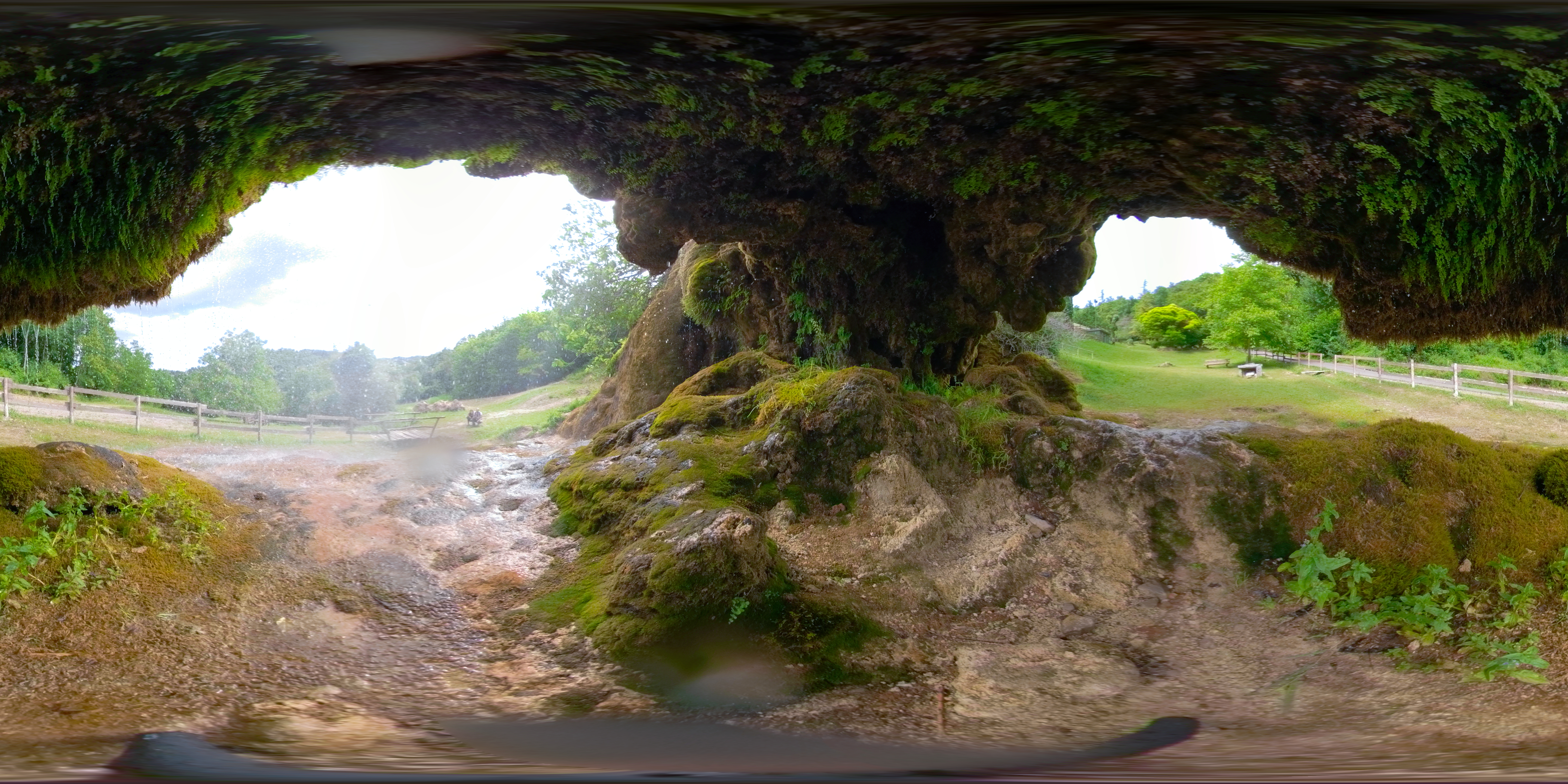
The source file shows a completed 5760 × 2880 spherical export, matching the still dimensions discussed above. It does not establish how a modern computer will process new captures. Its Commons page also flags invalid location metadata; we do not use those coordinates to place the scene. For business and construction records, this is a reminder to verify metadata independently of whether the image looks correct.
For travel, think of the camera, paired cards, charging arrangements and processing device as one kit. Before a long trip, test a realistic batch rather than a single clip. The return-home stitching workload can matter as much as what fits in the bag.
A venue may want both a navigable tour and social clips. Treat those as separate deliverables with separate checks. Owner-operated Panorra provides panoramic travel inspiration, but this guide makes no Fusion-specific integration claim.
Used-camera decision
| Priority | Relevant comparison |
|---|---|
| Stay with a GoPro 360 camera | Original GoPro MAX: compare its still-photo file route separately from Fusion's paired-card process. |
| Edit difficult window-lit interiors | Theta Z1: assess its RAW/HDR workflow and delivered result against the time your Fusion processing requires. |
| Prioritize room-by-room delivery | Theta X: compare finished panoramas and capture convenience at a consistent viewing scale. |
These are proposed comparisons, not an original head-to-head test or a promise that another camera will fix every seam.
Request untouched paired files from an indoor scene and process them on your own setup before buying. Inspect both exposed lenses, card slots, doors and battery condition. Include replacement accessories and processing time in the budget rather than judging the camera by body price alone.
Our conclusion is conditional: Fusion is most defensible when you already have a verified workflow and its output meets the brief. If you need predictable high-volume real-estate delivery, compare that proven end-to-end result against alternatives before committing. No current price or original performance score is asserted.
Research checked 21 September 2026.




Comments ()