Ricoh Theta SC2 for Real Estate & Business Virtual Tours
Camera analysis · Entry-level 360 photography
The SC2 is worth considering for straightforward panoramic documentation, especially if you already own one. A new purchase needs a clear quality target and a careful check of the exact model.
Where the SC2 fits
A small camera can make it easier to document rooms regularly, but convenience should not set the quality standard for a paid tour. Start with a finished panorama on the client's intended screen. If it communicates the space clearly at normal viewing angles, the SC2 may be sufficient for that assignment. If visitors need to examine fine interior details, compare higher-resolution alternatives before buying.
For an existing owner, the useful question is whether better capture discipline and a verified delivery workflow solve the current problem. For a new buyer, compare the complete cost—including support, hosting and time—not just the price of a used body.
The core specifications
| Feature | Theta SC2 |
|---|---|
| Sensors | Two 1/2.3-inch-type back-illuminated CMOS sensors |
| Aperture | f/2.0 |
| Still image dimensions | 5376 × 2688 pixels |
| 360 video | 3840 × 1920 or 1920 × 960, at 29.97 fps |
| Still exposure options | Auto, shutter priority, ISO priority and manual; smartphone needed for specified settings |
| Listed shooting distance | Approximately 10 cm to infinity; not a guarantee of error-free close stitching |
| Storage / power | Approximately 14 GB internal memory; built-in battery; Micro-USB connection |
Source: Ricoh SC2 user guide. Focus and stitching are separate considerations: a nearby object can be sharp yet distorted where the lens views meet.
SC2 versus SC2 for Business
Ricoh describes SC2 for Business as a variant based on the standard camera, with a ROOM preset for indoor and vehicle-interior HDR capture. It starts in that preset when switched on. Do not assume a listing for the ordinary SC2 includes the Business model's startup behavior.
That distinction matters when different staff members use the same camera. A preset can reduce setup decisions, but someone must still inspect the files and confirm the capture suits the scene. A business label does not make a panorama a measured floor plan or guarantee acceptance by a particular tour service.
Ricoh also clarifies that ROOM and the ordinary SC2's HDR option use essentially the same capture approach, accessed differently. The standard model is not excluded from HDR photography. The Business variant adds Time Shift within ROOM, allowing sequential lens capture so the operator can move out of view. Treat that as a capture workflow—not automatic removal of every moving person—and use a tripod for ROOM/HDR.
The resolution budget for a full sphere
SC2 still versus 4K video-frame width
Still panorama — 5,376 pixels
4K panorama frame — 3,840 pixels
Avoid judging the camera from a tiny preview alone. Examine a doorway, furniture edges and printed text inside the delivered viewer. If your client expects heavy zooming, demonstrate the actual limits before promising the job. Dedicated still capture and a frame taken from video are not equivalent deliverables.
What independent experience adds
For additional viewing, see Ben Claremont's Is this the BEST budget virtual tour camera? We verified the title and creator through YouTube's own metadata. The linked review is historical; we have not independently verified its full transcript and do not present unexamined video claims as test evidence.
Daniel W. Rasmus's November 2020 hands-on review praised straightforward shutter operation and responsiveness, but found the Wi-Fi and multi-app workflow cumbersome. Ricoh supplied the review unit on loan. These observations are useful historical usability evidence, not a current test of every supported phone or application version.
Before relying on an older review's software instructions, check recent documentation. Ricoh's May 2026 RICOH360 app announcement adds Auto White Balance color-correction intensity controls for SC2 and SC2 for Business. The settings-retention and reduced-camera-reflection changes in that announcement apply to Z1, not SC2. We have not tested the app-camera combination; the announcement establishes documented software changes, not a guarantee for your device.
HDR capture, saved settings and local files
The archived SC2 My Settings instructions document registering exposure mode, shutter, ISO, exposure compensation, white balance and HDR/noise-reduction options through the basic smartphone app. Ricoh requires a stable support for HDR or noise reduction and warns that powering off before capture finishes prevents the image from being saved. These are model-specific instructions for the older app; check the corresponding controls in your installed app before a job.
Our recommended check is to register the intended room settings, power-cycle the camera and verify the recalled values with a test capture. Do not infer behavior from the SC2 for Business startup preset or from a Z1 update announcement. Keep a settings note with each assignment, especially when several operators share the camera.
The manufacturer's specification lists JPEG still files, not a DNG RAW output. That matters when choosing an editing strategy: an HDR-rendered JPEG is a finished composite, not the same starting point as a RAW capture. Preserve the original JPEG before adjusting color, masking the tripod or creating a delivery-size copy.
Ricoh's SC2 USB import guide describes file retrieval through Windows device access or Photos/Image Capture on Mac. Wait until copying finishes before disconnecting. This local route is separate from the discontinued sharing website; inspect the final full-sphere file in your tour viewer and check the horizon, initial direction and privacy edits after upload.
A genuine SC2 architectural panorama
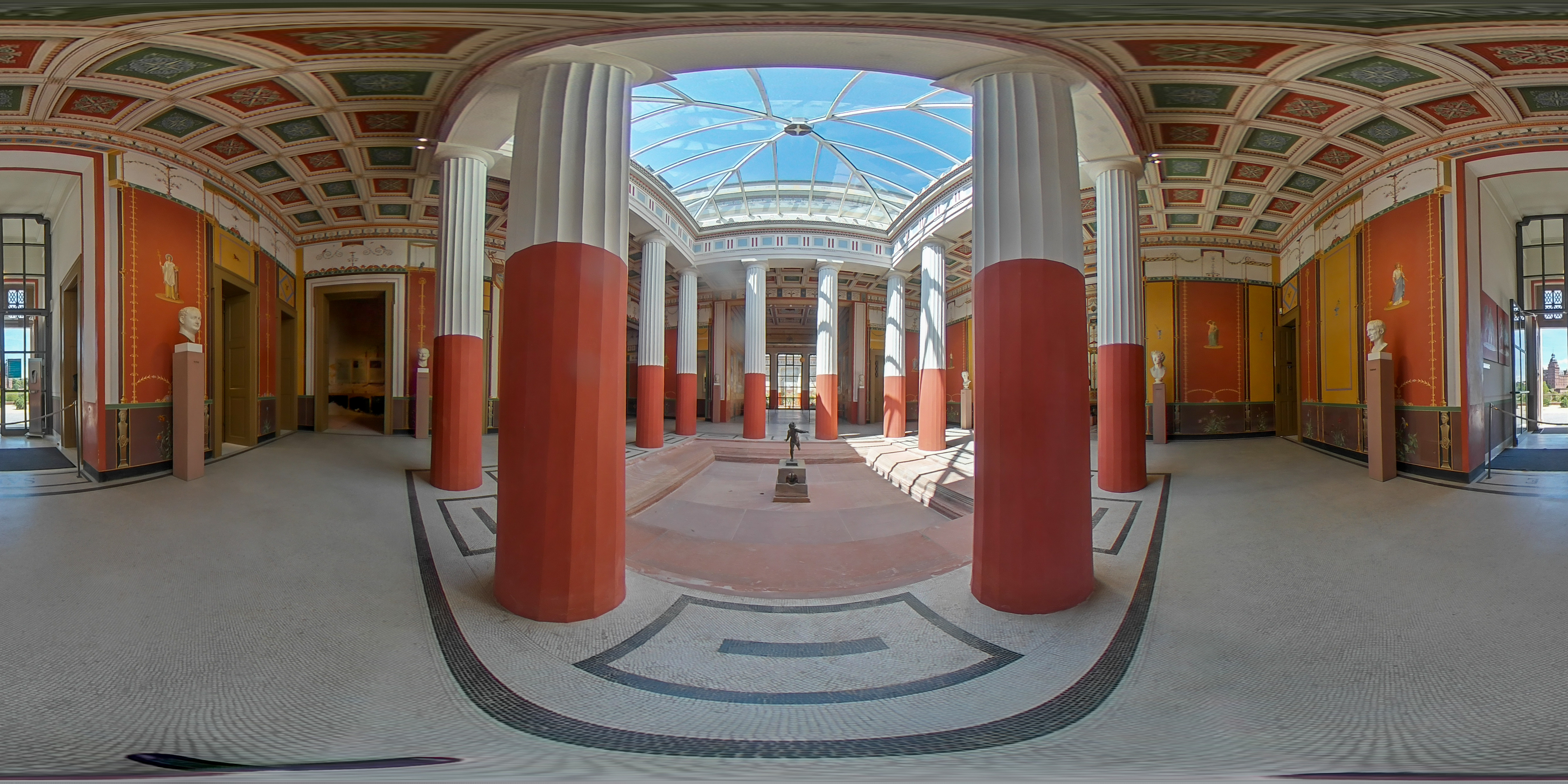
This example connects architectural documentation with travel storytelling: a single sphere includes columns, ceiling, floor and adjoining spaces. The flattened projection stretches the scene; assess an interactive panorama at normal viewing angles before judging straight lines. Because the creator's complete capture and editing process is unknown, we do not use this image to assign dynamic-range or sharpness scores.
Real-estate and business tours
Ricoh's September 2026 notice confirms SC2 support in RICOH360, the successor to the discontinued THETA app. Check this route when preparing a new control phone.
The theta360.com sharing service closed in January 2025. Historical sharing tutorials need that qualification. Keep the capture, local export and chosen hosting service as separate steps in your delivery checklist.
Test the SC2 in an actual representative interior. Include a bright window, a darker adjoining room and a reflective surface. Review whether the exposure communicates the property naturally and whether the seams remain unobtrusive at normal viewing angles. Correct positioning often matters more than a speculative editing fix.
For a business venue, capture while movement is limited and check every direction for private documents or staff-only areas. Establish a consistent camera height where practical. Keep the original captures and verify that the delivered tour opens correctly on the phones your audience uses.
GoThru operates this publication. Test a completed export with your selected tour platform before committing to a client delivery; no camera-specific integration certification is claimed here.
Construction: a visual record with a defined purpose
The SC2 may be useful for documenting overall room conditions, but do not assume the file will show small workmanship details clearly. Decide whether the record is intended to support orientation and discussion or to document a specific detail. Supplement a panorama with appropriate close photographs when detail matters.
Use dated, named viewpoints so project teams can understand what they are comparing between visits. Coordinate access and safe capture positions with the site team. This guide establishes no environmental or hazardous-location certification, measurement accuracy, automated defect detection or BIM alignment.
Travel photography without overpromising
A simple panoramic record can preserve the relationship between a viewpoint, the landscape and the people sharing it. Protect the lenses in transit and test your phone connection before leaving reliable connectivity. Do not make the first attempt at file transfer at the end of a long trip.
Think of the SC2 as a camera for intentional scenes rather than assuming it competes with modern action-oriented video cameras. For panoramic destination inspiration, explore owner-operated Panorra; an SC2-specific upload workflow has not been tested for this guide.
The internal storage and built-in battery make preparation important on a multi-property day or a trip: budget time to copy and verify files and to recharge, rather than planning on swapping a memory card or battery between stops. Test an older unit over a representative session. Its original capacity figures do not establish the remaining health of the battery you are buying.
Should you buy or keep it?
| Question | Comparison |
|---|---|
| Is the older SC equivalent? | Theta SC has different software support; do not confuse it with SC2 on a used listing. |
| Do difficult windows justify RAW editing? | Theta Z1 provides a different RAW/HDR workflow to evaluate alongside processing time. |
| Does the tour need more still-image detail? | Theta X is a useful still-focused comparison; inspect delivered files at the same viewing scale. |
These are comparison paths, not our own head-to-head results. A software or workflow difference may matter more than the camera's headline resolution.
Keep using an SC2 when its finished output meets a clearly agreed brief and its connection workflow is reliable for your team. When buying, verify the standard or Business variant, inspect the lenses and request original files. Compare alternatives when the assignment demands more detail, a different editing route or specialized field protection.
Research checked 21 September 2026. No numeric score is assigned without our own testing.




Comments ()