
Add a Logo to the Nadir
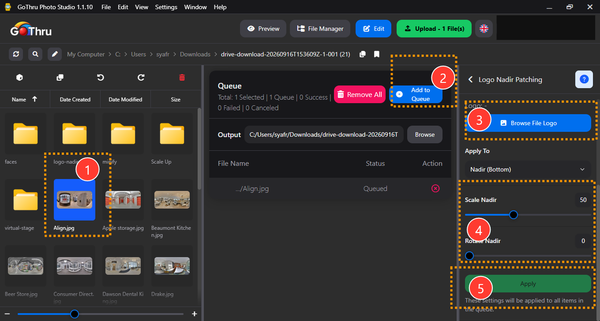
Nadir patching places a logo at the bottom of a panorama. It can cover the tripod area while adding consistent branding to a tour.
Prepare the logo
- Use a PNG with a transparent background.
- Leave padding around the mark so it does not feel crowded.
- Use a high-resolution source to avoid blur.
Apply the patch
- Open the panorama in Photo Studio.
- Choose the nadir or logo patching tool in the editing workspace.
- Select your logo file.
- Adjust the size and position while checking the 360° preview.
- Export the result as a new file.
Check the result
Rotate the preview straight down. The patch should cover the tripod without hiding more of the floor than necessary. Check the logo orientation from the intended starting view before processing the rest of the project.