Find a Google Trusted 360 Photographer: Search the Map, Compare the Work, Contact Directly
Use the 360 Photographer Directory to search by location, compare portfolios and reviews, and contact a suitable immersive-imaging professional directly.
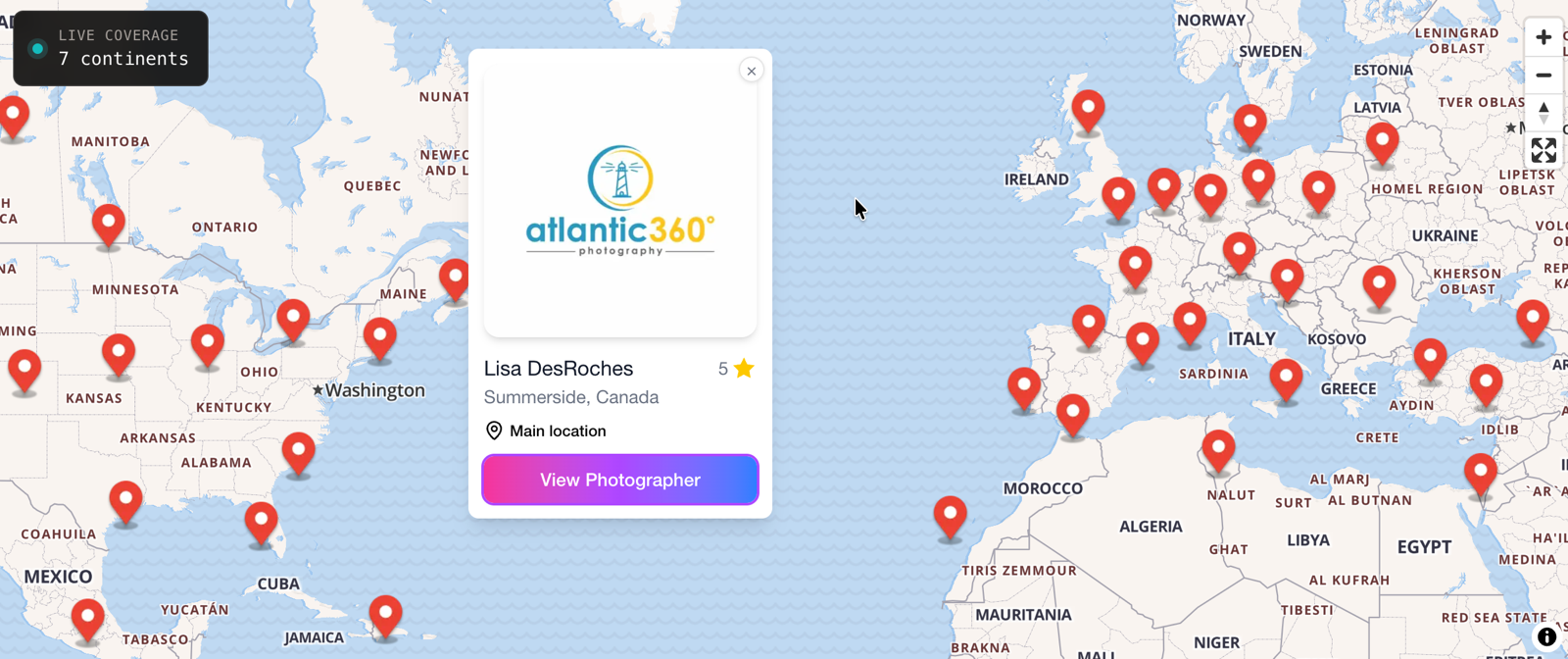
A hotel team planning a virtual tour usually knows the city, the property and the deadline. To find a 360 photographer who can handle the assignment, the team needs more than a generic web search. The same problem appears when a business searches for a virtual tour photographer: broad results can include agencies, software pages and professionals working hundreds of miles away.
Photographers have the opposite problem. Strong work is not enough when local clients cannot find it, compare it or understand the services behind it.
The 360 Photographer Directory is built around that gap. It is a global, client-facing directory of verified 360-degree photographers and immersive-imaging professionals. Clients can begin with a location, compare individual profiles and contact a suitable specialist directly. The directory does not take the job, create the tour or operate as a commission marketplace.
At the time of this review on August 6, 2026, the live site showed 160 verified photographers across seven continents and an average rating of 4.8 out of 5. Those figures will change as listings and reviews are added.
Start with the map, not a spreadsheet
Suppose a hotel group needs new immersive imagery for a property in Toronto. The useful starting point is Toronto, not a long alphabetical list of photographers from around the world.
The directory lets a visitor begin globally and narrow the search by continent, country and city. The selected location appears as a visible hierarchy, and the URL changes to a location-specific route. A visitor can also type a city or place into the location search and choose from matching city, country or continent results.
The dedicated Find Photographers view places an interactive map beside a nearby-photographers list. As the visitor pans or zooms the map, the list updates to show photographers inside the current view. The interface also reports how many photographers are visible.
This is useful when a project sits between cities or covers a wider region. The map position panel shows the current geographic level and lets the visitor apply that view as a continent, country or city filter. Instead of fighting a fixed search radius, the client can explore the area visually and then decide how narrowly to filter it.
On mobile, the map and list become separate views. Visitors can switch between them without abandoning the search, which makes it practical to compare options while discussing a project on site.
Comparison without guesswork
Finding several photographers nearby is only the first step. The next question is whether any of them fit the assignment.
The nearby list has an in-list search, a Featured-only filter and three clear sorting choices:
- Top rated orders profiles by rating, with review count used as the tie-breaker.
- Recent orders listings by the date they were added.
- A-Z provides a simple alphabetical scan.
The visitor chooses the order. There is no need to explain the results with a mysterious ranking algorithm. A client who values an established reputation can start with Top rated. Someone checking new coverage in a market can choose Recent. Featured listings can be viewed separately, but Featured status should not be read as a change to the normal Top rated order.
Opening a profile gives the client a better decision page than a name and thumbnail in a search result. Depending on what the photographer has supplied, a profile can show location and coverage, years of experience, services, website, availability, equipment, rating, reviews and a direct contact route.
Profiles can also include interactive portfolio work from GoThru, Google Street View, Panorra or Matterport. That matters for immersive imaging. A flat screenshot may look polished while hiding navigation, stitching or image-quality problems that become obvious once a client opens the actual experience.
| What clients can evaluate | What photographers can present |
|---|---|
| Location, coverage and services | A dedicated location-led profile |
| Experience and supplied availability | Work history and service information |
| Ratings and visible reviews | Reputation in context |
| Interactive portfolio examples | Immersive work rather than static thumbnails |
| Website and direct contact options | A route for relevant clients to get in touch |
Not every profile contains every field or portfolio provider. The value comes from giving each photographer a structured place to supply the information that helps a client make a short list.
Reputation people can see
Ratings and review counts appear on photographer profiles and help visitors compare options. The review system provides two identity routes, and their limits are important.
A reviewer can sign in with LinkedIn. When that route is used, the review can show a "LinkedIn verified" badge together with the reviewer's LinkedIn-supplied name and photo. The interface states that it does not access the reviewer's connections, employer or posts.
That badge confirms that the reviewer authenticated with LinkedIn during the review flow. It does not independently prove that a commercial project took place, and it does not guarantee the content of the review. It also does not appear on every review. Older reviews and reviews submitted through the email route can exist without the badge.
The alternative route sends a review link by email. The reviewer must complete reCAPTCHA before the link is sent. This gives people who do not want to use LinkedIn another way to access the review form while adding an email-confirmation step.
The practical benefit is transparency. Clients can see the rating, the number of reviews and, where applicable, which reviewers used LinkedIn authentication. They can weigh those signals alongside the portfolio and profile details rather than treating a single badge as proof of quality.
Why the directory matters to photographers
A general portfolio site shows the work, but it may not answer the client's first question: who can handle this project in this location?
The directory starts where project intent is strongest. A client searches the area where the photography needs to happen, then sees professionals working within that map view. This gives a photographer a chance to be considered in a location-led search without promising leads, bookings or search-engine placement.
A dedicated profile also puts useful context around the portfolio. The photographer can bring together coverage, experience, services, supplied availability, reviews and a direct contact route. Interactive examples let the work carry more of the conversation, especially when the final deliverable is itself an interactive experience.
Each listing has its own indexable profile URL and structured professional information. That creates a clearer web presence than appearing as one line in a generic directory, but it is not a guarantee of rankings or traffic. The profile still needs accurate details, representative work and a contact route that someone monitors.
Verified listing status, public ratings and optional LinkedIn-verified reviewer badges can add trust signals. They work best together. None replaces the client's responsibility to review the portfolio, explain the assignment and check that the photographer is available and suitable.
A three-step way to hire a 360 photographer
1. Choose the project location
Search the city or area where the photography will take place. Use the map to widen or narrow the view, then apply the most useful city, country or continent filter.
2. Compare a short list
Open several profiles. Check location coverage, relevant services, experience, reviews and interactive portfolio examples. Choose Top rated, Recent or A-Z according to how you want to research the available listings.
3. Contact the best fit directly
Send a concise project brief through the supplied contact route. Include the location, type of space, approximate number of shooting positions, intended publishing platform, preferred dates and any access constraints. The directory helps with discovery and comparison; the client and photographer handle the working relationship directly.
Find the right specialist, or make your work easier to find
For businesses, the directory turns a vague search for a "360 photographer near me" into a location-led comparison of real profiles and work. Start with the live photographer map, compare a few suitable professionals and contact the best fit for the assignment.
For photographers, the directory offers a focused place to show where you work, what you do and how clients can reach you. It does not promise leads or preferred placement. It gives relevant clients more information when they are actively looking. Photographers who want to ask about a listing can use the directory's Contact page.